

Quick Answer
NNTP pipelining reduces wait time between article requests, which can improve speed in higher-latency setups or when using fewer connections—but gains level off once your connection is already maxed out.
What Is NNTP Pipelining?
NNTP pipelining is a connection behavior that changes how your newsreader communicates with Usenet servers. Instead of sending one request and waiting for a response before sending the next, pipelining allows multiple article requests to be sent back-to-back.
That shift removes idle time between requests. On slower or long-distance connections, that delay adds up quickly.
With pipelining enabled, your newsreader keeps the server busy instead of waiting on each individual response.
Pipelining is currently a feature only available on SABnzbd.
How NNTP Pipelining Works
A standard connection looks like this:
- Request an article
- Wait for the server to respond
- Request the next article
That wait period—called latency—is where time is lost.
With NNTP pipelining, the process changes:
- Send multiple article requests in a batch
- The server processes them in sequence
- Responses are returned without repeated delays
This approach is similar to keeping a queue full instead of sending one item at a time.
Why Latency Matters
Latency is the round-trip time between your device and the Usenet server. The farther away the server, the higher the latency tends to be.
Each request-response cycle includes that delay. When repeated thousands of times, it becomes a real bottleneck.
Pipelining reduces the impact of latency by cutting down how often your system has to wait.
When NNTP Pipelining Helps Most
Pipelining is not a universal speed boost. It works best under specific conditions:
- Higher-latency connections (for example, cross-region or international routing)
- Lower connection counts
- Systems that are not already hitting full bandwidth
In these cases, reducing request delays can noticeably improve throughput.
Real-World Pattern
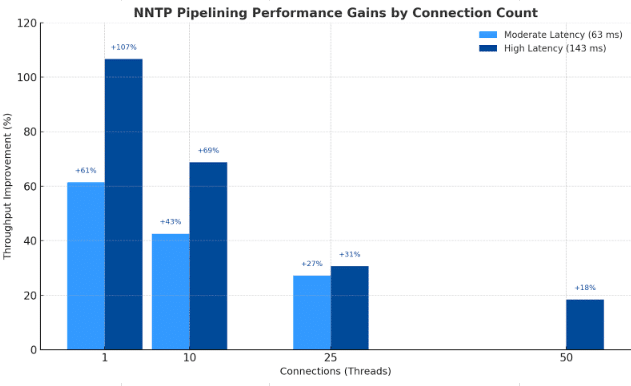
Testing across different setups shows a consistent trend:
- With 1–10 connections, gains can be significant
- With 25 connections, improvements are still measurable
- At 50–100 connections, results flatten out or disappear
Once your connection is already saturated, there is little room for improvement.
When It Makes Little Difference
Testing across different setups shows a consistent trend:
- With 1–10 connections, gains can be significant
- With 25 connections, improvements are still measurable
- At 50–100 connections, results flatten out or disappear
Once your connection is already saturated, there is little room for improvement.
How to Enable NNTP Pipelining in SABnzbd
In SABnzbd, pipelining isn’t labeled directly—it’s controlled through how many articles are requested at once.
To adjust it, head into your server settings and look for the field called Articles per request. That number defines how aggressively SABnzbd queues requests instead of waiting between them.
Here’s the quick path to get there:
- Open SABnzbd in your browser
- Go to Settings → Servers
- Expand your server using Show Details
- Locate Articles per request
From there, you’re just tuning a number.
How to Set It
- Start with a modest value (around 5–10)
- Increase gradually if you’re testing for gains
- Watch how your speeds respond after each change
If the number is too low, you won’t see much benefit. Too high, and you may introduce inefficiencies or instability depending on your setup.
Think of it as finding the point where your connection stays busy without overdoing it.
Choosing the Right Balance
Pipelining works alongside connection count—not as a replacement.
If your plan supports many connections, increasing connections may still be the most direct way to improve speed. Pipelining becomes more useful when you are working within connection limits or dealing with higher latency.

The goal is to keep your connection active without overloading it.
When Pipelining Is Worth Using
NNTP pipelining can provide meaningful speed improvements in higher-latency scenarios or with lower connection counts, but benefits decrease once bandwidth is already fully utilized.
That makes it a practical setting to test rather than a guaranteed upgrade.
Bottom Line
NNTP pipelining is a simple adjustment that can improve efficiency under the right conditions. It does not replace a strong Usenet provider or sufficient connections, but it can help close performance gaps caused by latency.
If your setup feels slower than expected, especially across longer distances, this is one setting worth testing.