
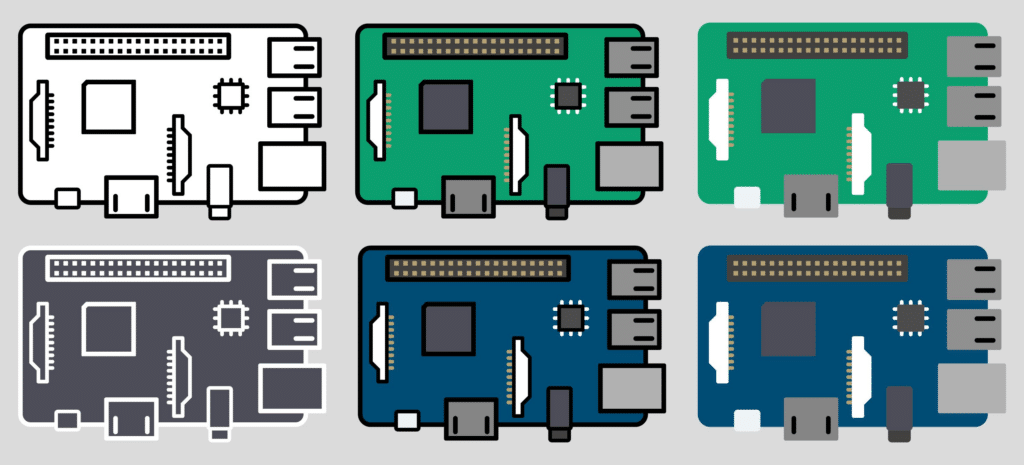
The best Usenet single board computer (SBC) is one that can reliably run a newsreader, handle SSL connections, process article repair and unpacking tasks, and stay online 24/7 with low power usage. For most users, the Raspberry Pi 5 is the best overall choice due to its balance of CPU performance, RAM capacity, and true Gigabit networking.
Higher-performance boards like the Rock Pi 5 or Orange Pi 5 are better suited for heavier automation stacks.
Quick Comparison: Best Usenet SBCs
| SBC | CPU Class | Max RAM | Storage Support | Best For |
|---|---|---|---|---|
| Raspberry Pi 5 | Quad-core ARM | 8GB | USB 3.0 SSD | Most users |
| Rock Pi 5 | 8-core ARM | 16GB | NVMe + USB 3.0 | Heavy automation |
| Orange Pi 5 | 8-core ARM | 16GB | NVMe + USB 3.0 | High performance value |
| ODROID-N2+ / M1 | Multi-core ARM | 8–16GB | eMMC / NVMe | Stable home server builds |
If you want a simple recommendation: Raspberry Pi 5 is the best starting point for most Usenet users. Choose Rock Pi 5 or Orange Pi 5 if you plan to run multiple automation tools and want faster repair and unpack times.
Why Use a Single Board Computer for Usenet?
Single board computers (SBCs) are compact, low-power systems that can run 24/7 without the noise or energy draw of a full desktop. For Usenet users, that makes them ideal for:
- Running a newsreader like SABnzbd or NZBGet
- Connecting to an Indexer
- Hosting automation tools
- Acting as a small, dedicated Usenet server in your home
With the right provider, strong article retention, and proper configuration, an SBC can handle everyday Usenet activity reliably.
The key is choosing hardware that balances CPU performance, RAM, storage speed, and network throughput.
1. Raspberry Pi 5
The Raspberry Pi platform remains the most popular entry point for a Usenet SBC build. The Raspberry Pi 5 is a major step up from earlier models.
Why it works well for Usenet:
- Quad-core ARM Cortex-A76 CPU
- Up to 8GB RAM
- True Gigabit Ethernet (no USB bottleneck)
- USB 3.0 for fast external SSD storage
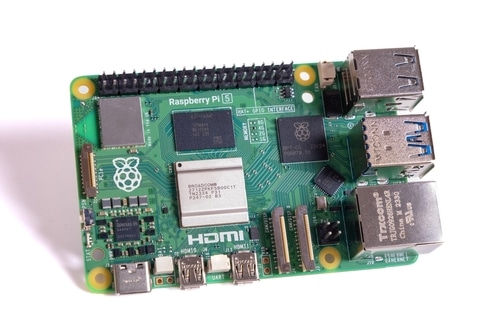
Compared to older Pi models, the Pi 5 handles SSL connections, unpacking, and repair operations much more smoothly. If you’re running SABnzbd with moderate automation, this board is more than capable.
Best use case: Lightweight to mid-range Usenet automation with external SSD storage.
2. Rock Pi 5
If you want more headroom, the Rock Pi 5 pushes SBC performance closer to mini-PC territory.
Why it stands out:
- Rockchip RK3588 CPU (8 cores)
- Up to 16GB RAM
- NVMe support via PCIe
- 2.5Gb Ethernet (on certain models)
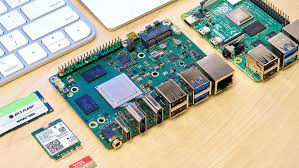
For users running multiple automation tools alongside their newsreader, the extra cores and NVMe storage support make a noticeable difference. Article repair and unpacking complete faster, especially with larger jobs.
Best use case: Heavier automation stacks with multiple background services.
3. Orange Pi 5
The Orange Pi 5 uses similar silicon to the Rock Pi 5 but is often priced more aggressively.
Key benefits:
- RK3588S CPU
- Up to 16GB RAM
- NVMe SSD support
- Strong price-to-performance ratio
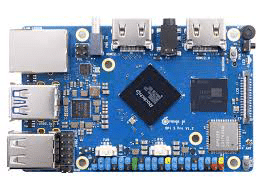
For advanced Usenet users running full automation suites, this board offers excellent value. It handles multiple SSL connections and background tasks without becoming a bottleneck.
Best use case: High-performance Usenet server on a tighter budget.
4. ODROID-N2+ / ODROID-M1
ODROID boards are often overlooked but are very capable for Usenet setups.
Why they’re a strong option:
- Stable ARM performance
- eMMC storage options (faster than microSD)
- Reliable Gigabit networking
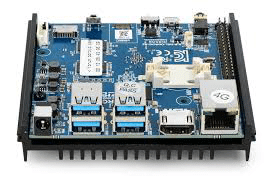
The ODROID-N2+ has been popular for home servers for years. The newer M1 adds NVMe support, which improves disk performance significantly.
Best use case: Budget-conscious users who still want solid performance and reliability.
What to Look for in a Usenet SBC
Not all SBCs are equal. Here’s what actually matters for Usenet performance:
1. CPU Power
Repair and unpacking tasks are CPU-intensive. A quad-core minimum is recommended. Eight cores provide smoother multitasking if you’re running automation.
2. RAM
4GB is workable. 8GB or more is better if you’re running SABnzbd or NZBGet and other tools together.
3. Storage Type
Avoid relying solely on microSD cards. Use:
- External SSD via USB 3.0
- eMMC modules
- NVMe SSD (if supported)
Disk speed directly impacts repair and unpacking times.
4. Network Throughput
True Gigabit Ethernet is important. Older boards that route Ethernet through USB can limit performance.
Recommended Software Stack
If you are building your first SBC-based Usenet setup, these Top10Usenet guides will help:
These walk through choosing a provider, configuring your newsreader, and connecting everything properly.
Most users pair their SBC with:
- SABnzbd or NZBGet as the newsreader
- A reliable Usenet provider with long article retention
- One or more Indexer services
Easynews is unique in that it offers Web-based access, allowing you to access Usenet directly through a browser. That means even lightweight hardware can work if most browsing and searching is done through the Web interface instead of locally installed tools.
Is an SBC Enough for Usenet?
For most home users, yes.
An SBC is more than capable of handling:
- Dozens of SSL connections
- Scheduled automation tasks
- Always-on Usenet access
If you’re processing very large workloads constantly, a mini PC with a desktop-class CPU may make sense. For 24/7 low-power operation, however, a modern SBC is efficient, quiet, and cost-effective.
Who Should Choose Which SBC?
Choose Raspberry Pi 5 if:
- You want a simple, well-documented build
- You are running one newsreader and light automation
- You prefer broad community support
Choose Rock Pi 5 or Orange Pi 5 if:
- You run SABnzbd plus multiple automation tools
- You want NVMe storage for faster unpacking
- You expect heavier 24/7 workloads
Choose ODROID if:
- You want reliable performance at a competitive price
- You prefer eMMC or NVMe flexibility
Bottom Line: Which Usenet SBC Should You Choose?
The best Usenet single board computer for most users is the Raspberry Pi 5 due to its balance of CPU performance, Gigabit networking, USB 3.0 SSD support, and low power usage.
Users running larger automation stacks or heavier workloads should consider higher-performance boards like the Rock Pi 5 or Orange Pi 5 with NVMe storage.
Your ideal choice depends on workload intensity, storage speed, and how many background services you plan to operate at the same time.
FAQ: Best Raspberry Pi and SBC Options for Usenet
Yes. A Raspberry Pi 5 can reliably run a Usenet newsreader like SABnzbd or NZBGet, maintain SSL connections, and handle moderate article repair and unpacking tasks when paired with an external SSD.
4GB is sufficient for a basic setup. 8GB or more is recommended if you plan to run automation tools such as Sonarr and Radarr alongside your newsreader.
NVMe is not required, but it significantly improves repair and unpacking speed compared to microSD cards. For heavier workloads, NVMe-capable boards like the Rock Pi 5 or Orange Pi 5 provide better long-term performance.
For most home users, yes. Modern SBCs can handle dozens of SSL connections, scheduled automation, and always-on operation. Extremely heavy workloads may benefit from a desktop-class CPU.